How to Install Custom Shaders Patch (CSP) in Assetto Corsa
Custom Shaders Patch (CSP) is the most important mod for Assetto Corsa. It adds dynamic lighting, rain, better visuals and many new car features. Most modern car and track mods are built for it.
There are two ways to install CSP:
- Method 1: With Content Manager. This is the easiest method. Content Manager downloads, installs and updates CSP for you.
- Method 2: Without Content Manager. You copy the files by hand. Use this method if you prefer the original launcher or don't want to install extra software.
Both methods give you the same result. Pick the one that suits you.
Why You Might Need CSP
Many mods only look worse without CSP, but some won't load at all. A typical example: you pick a modded car, the loading screen starts and the game closes to the desktop. The log (Documents\Assetto Corsa\logs\log.txt) ends with an error like this:
INIReader::getInt
CarAvatar::initCommon
Sim::addCar
This means the game tried to read a car setting it doesn't understand. Mods that use CSP's extended physics or lighting features do this in vanilla Assetto Corsa. The car loads fine once CSP is installed.
A quick test: if stock Kunos cars work but a mod car crashes while loading, a missing CSP is the most likely cause.
Requirements
Both methods need:
- Assetto Corsa v1.16.3 or v1.16.4 (64-bit). Steam updates the game automatically. You can see your version in the first lines of
log.txt. - Microsoft Visual C++ Redistributable 2015 (x86). Download it from Microsoft's website if it isn't installed.
Method 1: Install CSP With Content Manager
Content Manager (CM) is a free replacement for the original Assetto Corsa launcher. It manages your mods, and it can install and update CSP with a single click.
Step 1: Download Content Manager
- Go to the official page: acstuff.ru/app
- Click Download. You'll get a ZIP file.
Step 2: Extract and Launch
- Extract the ZIP into its own folder, for example
C:\ContentManager. - Run
Content Manager.exe. - On first launch, CM asks for your Assetto Corsa folder. Select the folder that contains
acs.exe. The default location is:
C:\Program Files (x86)\Steam\steamapps\common\assettocorsa
- Enter your driver name, then finish the setup. Keep Steam running while you do this.
Step 3: Install CSP
- Click Settings in the top right corner.
- Open the Custom Shaders Patch tab.
- Click Install and choose the latest version marked Recommended.
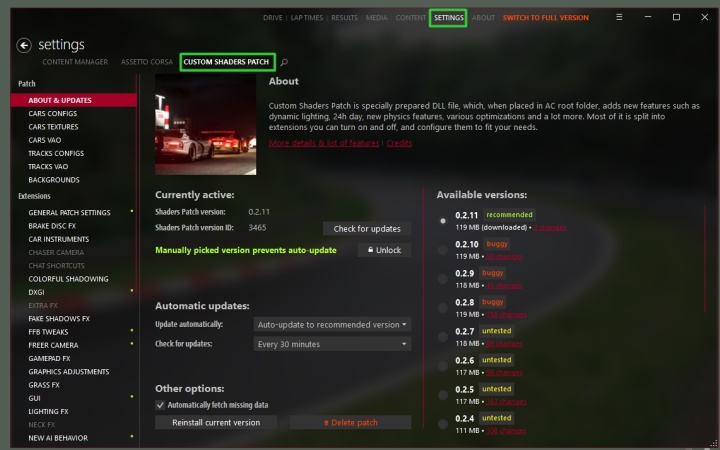
When the install finishes, the CSP settings appear on the same page. You can adjust graphics, lighting and car features from here at any time. To update CSP later, come back to this tab and install the newer version.
Step 4: Launch the Game From Content Manager
- Open the Drive tab.
- Pick a car and a track.
- Click Go.
From now on, always start Assetto Corsa from Content Manager instead of Steam, so your mods and CSP settings load correctly.
Tip: if CM shows an "Access denied" error or the install doesn't finish, the game folder is probably write-protected because it sits inside Program Files. Close CM, right-click
Content Manager.exe, choose Run as administrator and try again.
Method 2: Install CSP Without Content Manager
Step 1: Download CSP
- Go to the official CSP page: acstuff.club/patch
- Download the version marked recommended. It is a single ZIP file of about 120 MB.
Only download CSP from the official page. Reuploads on other sites may be outdated or modified.
Step 2: Open the Assetto Corsa Folder
- Open Steam and right-click Assetto Corsa in your library.
- Choose Manage → Browse local files.
You are in the right folder if you can see acs.exe.
Step 3: Copy the Files
Open the ZIP you downloaded. It contains:
- an
extensionfolder - a
dwrite.dllfile
Copy both into the Assetto Corsa root folder, next to acs.exe. If Windows asks whether to replace files, click Yes. If it asks for administrator permission, allow it.
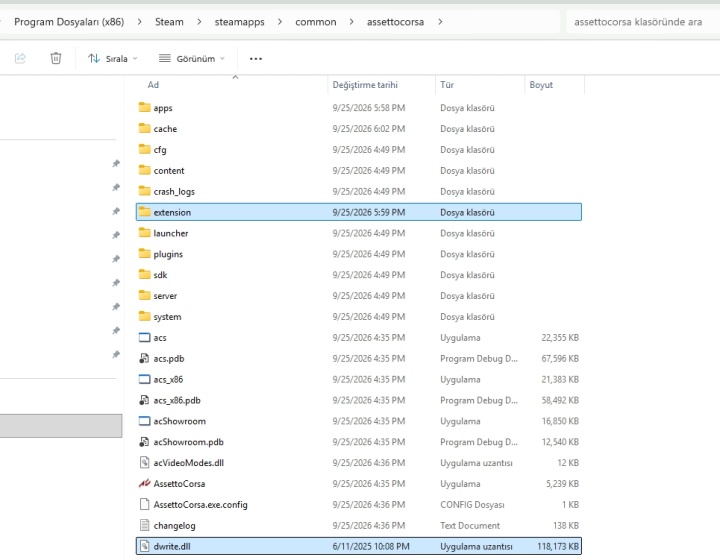
Your folder should now look like this:
assettocorsa\
├── acs.exe
├── dwrite.dll      ← new
├── extension\      ← new
├── content\
├── system\
└── ...
Common mistake: extracting the ZIP into its own subfolder, such as
assettocorsa\lights-patch-v0.2.11\. CSP only loads whendwrite.dllsits directly next toacs.exe.
Step 4: Change CSP Settings
Without Content Manager, you change CSP settings inside the game, from CSP's settings app in the in-game app bar on the right side of the screen.
Your settings are saved in:
Documents\Assetto Corsa\cfg\extension\
Back up this folder if you move to a new PC or reinstall the game, so you keep your settings.
To update CSP later, download the new version and copy its files over the old ones, the same way as Step 3.
Check That CSP Is Working
This works for both methods:
- Start Assetto Corsa and load any car on any track, then quit.
- Open
Documents\Assetto Corsa\logs\log.txt.
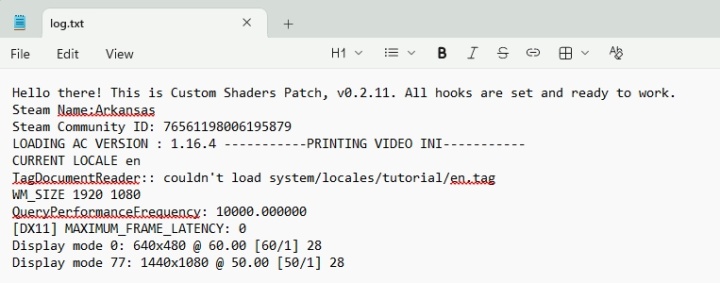
The first line should read:
Hello there! This is Custom Shaders Patch, v0.2.x. All hooks are set and ready to work.
If you see this line, CSP is installed and running. If the log starts with Installing CrashGuard Fault Handler and never mentions Custom Shaders Patch, CSP didn't load. Go through the install steps again.
Optional: Weather and Lighting Mods
CSP is the base. Weather and lighting mods such as Sol or Pure are separate downloads. Install CSP first, then add one of them.
- With Content Manager: drag the downloaded ZIP into the CM window and confirm the install prompt in the top right. Then turn it on as described in the mod's own instructions.
- Without Content Manager: follow the install instructions that come with the mod.
How to Uninstall CSP
- With Content Manager: open Settings → Custom Shaders Patch and turn off the patch there. To remove it completely, delete the files as described below.
- Without Content Manager: delete
dwrite.dlland theextensionfolder from the Assetto Corsa root folder.
The game goes back to vanilla. Your settings in Documents\Assetto Corsa\cfg\extension\ stay in place, so delete that folder too if you want a completely clean start.
Troubleshooting
The game still crashes when loading a mod car. Check that CSP actually loaded (see "Check That CSP Is Working"). Also check the mod's download page. Some mods need a minimum CSP version, so make sure you installed a recent one.
My antivirus deleted or blocked dwrite.dll. Antivirus programs sometimes flag this file by mistake, because it hooks into the game. Restore the file and add the Assetto Corsa folder as an exception.
The game doesn't start after installing CSP. Install the Visual C++ Redistributable 2015 (x86), and make sure your game is v1.16.3 or newer.
Stock cars work, but one mod car crashes. First make sure CSP loaded. If it did, check the car's folder in content\cars\. A common problem is an extra nested folder, such as car_name\car_name\..., or a missing data.acd file.
FAQ
Which method should I choose? Content Manager if you want the easiest setup and one-click updates. The manual method if you want to keep the original launcher and install nothing extra.
Is Content Manager required for CSP? No. Content Manager makes installing and updating easier, but CSP works fine when installed by hand.
Is Content Manager free? Yes. There is a paid full version with extra features, but the free version can install and update CSP.
Does CSP work online? Yes. Many servers even require it. Check the server's requirements before joining.